AI stock screener for day trading: describe the setup, get a live scan
Bufflo’s AI stock screener for day trading turns a plain-English description of your setup into editable screener rules that scan the market in real time. Describe price, float, relative volume, VWAP, moving averages or fresh news, check the rules Bufflo AI writes, and run the screen through pre-market, regular hours and after-hours.
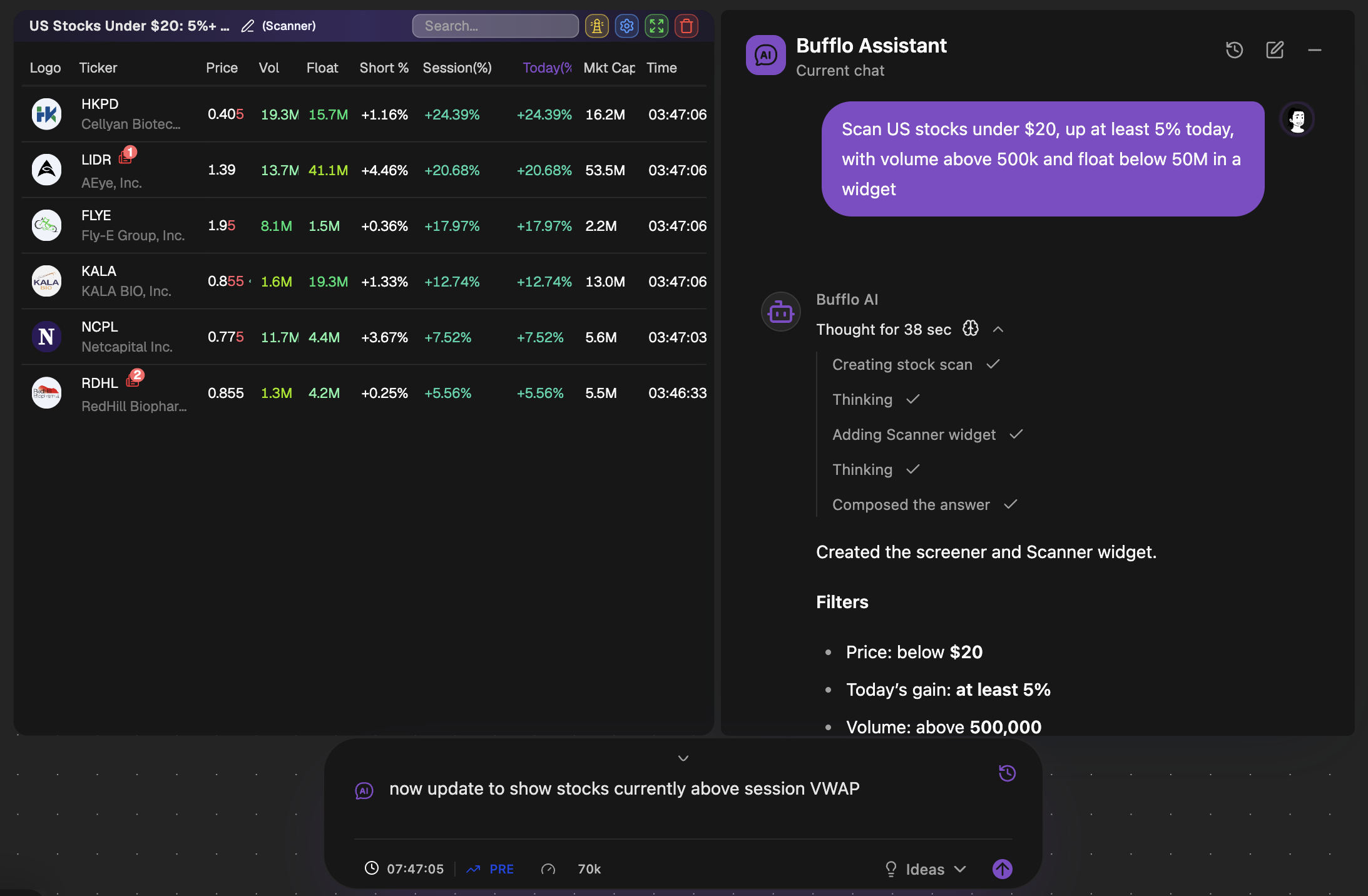
Most screeners make you translate an idea into dropdowns: pick a field, pick an operator, type a number, repeat. That works for simple filters. It breaks down for the setups traders actually describe to each other, like “a pullback to the 9 EMA that holds above VWAP and closes back above the prior candle high on volume”.
An AI stock screener starts from that sentence instead. You describe the setup the way you would explain it to another trader, and the AI turns it into screening rules. The part that matters is what happens next: whether you can read those rules, change them, and trust that the scan is running on live data.
Try it: ask Bufflo AI
- Ask Bufflo AI“Up 10% today, under $20, with float below 10 million and 5x relative volume”
- Ask Bufflo AI“Crossing above VWAP with volume at least twice the daily average”
- Ask Bufflo AI“New 52-week high with RSI above 70 and expanding volume”
- Ask Bufflo AI“Above the 200-day moving average with RSI under 30 on a pullback”
How Bufflo builds a screener from a sentence
- Describe the setup. Type it in plain English, the way you would explain it to another trader. Include the numbers that matter to you: price range, percentage move, float, volume multiple, timeframe.
- Read the rules. Bufflo AI converts the request into explicit screener conditions and shows them to you. Nothing runs as a hidden black box.
- Edit anything. Tighten a threshold, add a condition, or ask Bufflo AI to change the screen in a follow-up message, such as “now only show stocks above session VWAP”.
- Run it live. The screen updates in real time through pre-market, regular hours and after-hours, in a Scanner table on your workspace.
- Reuse it. Save the screener and apply the same rules to Scanner, Signal, News and Halt tables, or run several screeners in parallel, each with its own alerts.
Click any row to send the ticker to a linked chart, so the scan, the chart and the news for the same name sit side by side.
What can you screen for?
You can combine conditions across price action, volume, share structure, technicals, session and news. These are the kinds of requests the screener is built around:
| Category | Example request |
|---|---|
| Price and change | Up 10% today and under $20 |
| Volume | 5x relative volume, or volume at least twice the daily average |
| Float | Float below 10 million shares |
| Moving averages | Breaking above the 50-day moving average on rising volume |
| VWAP and EMAs | Above session VWAP with the 9 EMA above the 20 EMA |
| Momentum | RSI above 70 on a new 52-week high |
| Session | Gapping up over 4% pre-market |
| News | With a news catalyst today |
Results show the columns traders check first, including price, volume, dollar volume, float, today’s change, gap, pre-market change, market cap, short interest, sector and industry.
Ready-made setups to start from
If you would rather start from a working example, the screener includes preset prompts for well-known setups, grouped by trading style. Each one is plain English, so you can read exactly what it checks and edit it before you run it:
- Momentum: VWAP pullback (long and short) and the 5-minute opening range breakout.
- Smart money: liquidity sweeps (long and short) and break-and-retest.
- ICT-style: fair value gap reclaim, fair value gap rejection and displacement retest.
- Elliott Wave: Wave 3 breakout.
The opening range breakout preset, for example, defines the range as the first three regular-session 5-minute candles, then looks for a close above the range high, above session VWAP, on at least 1.5 times the average volume of the prior 20 candles.
What to look for in a stock screener for day trading
A screener built for end-of-day investing will miss most day trades. Before you choose one, check these:
| What to check | Why it matters | In Bufflo |
|---|---|---|
| Real-time data | A delayed screen shows moves after they happen | Real-time on Trader and Premium; every 5 seconds on Starter, every 15 on Free |
| Pre-market and after-hours | Many day trades are set up before 9:30 a.m. ET | Scans run from 4:00 a.m. to 8:00 p.m. ET |
| Float and relative volume | The two filters behind most momentum setups | Both, in any combination |
| News | A catalyst explains why a stock is moving | Filter for news today and read it beside the scan |
| Alerts | You cannot watch every screen at once | Sound, web and phone alerts on each screener |
| A mobile app | Setups do not wait for you to be at your desk | Web, iOS and Android |
AI screener vs a traditional filter screener
| Filter-based screener | Bufflo AI screener | |
|---|---|---|
| Setting up a scan | Choose fields and operators one at a time | Describe the setup in a sentence |
| Multi-step setups | Hard to express sequences such as “sweep, then reclaim” | Describe the sequence and the rule that rejects it |
| Seeing the logic | The filters you picked | The rules Bufflo AI wrote, which you can edit |
| Changing the scan | Rebuild the filters | Edit a rule or ask for the change in plain English |
| Where results go | A results list | Live Scanner, Signal, News and Halt tables, with alerts |
How to write a screener prompt that works
The AI can only screen for what you tell it. Vague prompts produce vague scans. A few habits make the difference:
- Use numbers. “Float below 20 million” beats “low float”.
- Name the timeframe. “Up 5% in the last five minutes” is a different scan from “up 5% today”.
- Say what disqualifies a setup. “Reject it if price closes back below VWAP” keeps failed moves off the list.
- Build in steps. Start broad, check the results, then tighten one condition at a time.
“Find good stocks to trade today.”
“US stocks under $20, up at least 5% today, with volume above 500k and float below 50M. Only show names above session VWAP.”
Frequently asked questions
Is the Bufflo AI stock screener free?
Bufflo’s Free plan includes a built-in screener, with stock data refreshing every 15 seconds. Custom screeners that Bufflo AI builds from your description come with the Trader plan (2 running at once) and Premium (5). See pricing for current limits.
What is the best stock screener for day trading?
The best one shows moves as they happen. Look for real-time data through pre-market and after-hours, float and relative volume filters, news, and alerts. Bufflo covers all of these and lets you describe the scan in plain English instead of building it filter by filter.
Is there a stock screener app?
Yes. Bufflo runs in the browser and on iOS and Android, so your screeners and their alerts follow you away from the desk.
Can I edit the screener the AI creates?
Yes. Bufflo AI shows the rules it generated, and you can change any condition yourself or ask for a change in a follow-up message. Saved screeners can be reused across Scanner, Signal, News and Halt tables.
Does the AI pick stocks for me?
No. The screener applies the conditions you describe and shows which stocks match them. It does not recommend what to buy or sell, and its output is not financial advice.
Do I need to know how to code?
No. You describe the setup in plain English and Bufflo builds the screen. There is no scripting language to learn.
Try it on a live workspace.
Open Bufflo in your browser, describe what you want in plain English, and adjust everything yourself. No install, no code.
Market monitoring and analysis, not a brokerage. Not investment advice. Backtested results do not guarantee future performance. Data availability and refresh rates depend on your plan and market data providers.
All features