Stock alerts app: real-time price, VWAP and news alerts with re-arm rules
Bufflo alerts fire when the full event you describe happens, not just when price crosses a line. Combine price, volume, news and halt conditions, such as a VWAP reclaim after fresh news, choose web or phone notifications, and decide what must happen before the alert re-arms. Every trigger is kept in a log.
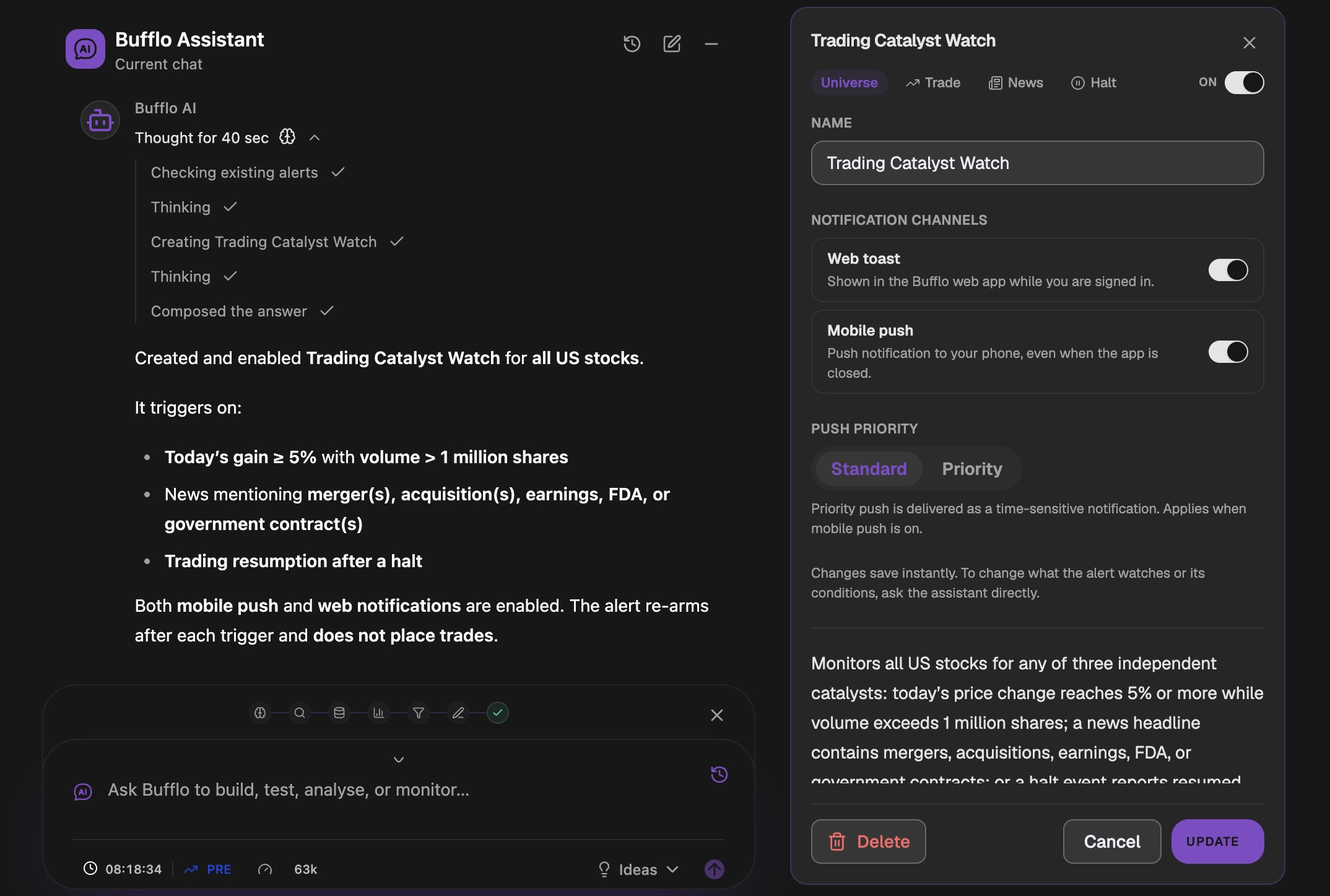
Most price alerts are a single line on a chart. Price touches it, your phone buzzes, and then it buzzes again every time price wobbles around the same level. The alert is technically correct and practically useless.
What you usually want to know is more specific: not “AMD is at $150” but “AMD just reclaimed VWAP, there is fresh news, and this is the first time today”. That needs alerts built from several conditions, with a rule for when they are allowed to fire again.
Try it: ask Bufflo AI
- Ask Bufflo AI“Alert me when AMD reclaims VWAP after fresh news. Re-arm only after price closes below VWAP.”
- Ask Bufflo AI“Alert me when any US stock is up 5% today on more than 1 million shares”
- Ask Bufflo AI“Alert me on news mentioning earnings, FDA or a government contract”
- Ask Bufflo AI“Alert me when a stock resumes trading after a halt”
Create an alert by describing it
Tell Bufflo AI what you want to be alerted about. It builds the alert, explains what it will trigger on, and turns it on. You can then review the conditions, rename it, change the notification channels or switch it off from the Alerts page.
Alerts can watch a single ticker or the whole US stock market, and can be built from four kinds of events:
| Event | Example |
|---|---|
| Price and volume | Up 5% today on more than 1 million shares |
| Intraday levels | Reclaims session VWAP |
| News | A headline mentioning a merger, earnings, the FDA or a government contract |
| Halts | A halted stock resumes trading |
What are re-arm conditions?
A re-arm condition decides when a triggered alert is allowed to fire again. Without one, an alert on a level can fire over and over as price chops around it. With one, you define the reset: for example, “re-arm only after price closes back below VWAP”. The alert then fires on the first reclaim, waits for the reset, and fires again only on a genuine second reclaim.
“Alert me when AMD reclaims VWAP after fresh news. Re-arm only after price closes below VWAP.”
VWAP alerts
VWAP, the volume-weighted average price, is the average price a stock has traded at during the session, weighted by volume. Many intraday traders treat it as the line between buyers and sellers being in control, so “reclaims VWAP” and “loses VWAP” are some of the most common alert requests.
In Bufflo you can describe a VWAP alert directly, combine it with a news or volume condition, and give it a re-arm rule so it does not fire on every tick around the line.
Where alerts reach you
- Web notifications in the Bufflo web app while you are signed in.
- Phone notifications, including a priority option delivered as a time-sensitive notification.
- Sound alerts on Scanner, Signal, Gappers, News and Halt tables, so new rows are heard as well as seen.
- A trigger log of every alert that fired, so you can review what happened and when.
Alerts and screeners work together
A screener finds candidates; an alert watches them. Run a momentum scan or a premarket gap scan, shortlist the names that matter, then set alerts on the exact event you are waiting for and step away from the screen.
Alerts tell you something happened. They never place trades: Bufflo is not a broker and does not trade automatically.
Frequently asked questions
Can I get stock alerts on my phone?
Yes. Bufflo alerts can be delivered as phone notifications as well as web notifications. A priority option delivers them as time-sensitive notifications.
Can one alert combine several conditions?
Yes. An alert can combine price, volume, intraday level and news conditions, and can watch a single ticker or the whole US stock market.
How do I stop an alert from firing over and over?
Give it a re-arm condition. The alert fires once, then waits until the condition you set, such as price closing back below VWAP, before it can fire again.
What is the best stock alert app?
One that alerts on the event you care about, not just a price line. Look for multi-condition alerts, rules that stop repeat alerts, phone notifications and a trigger log. Bufflo has all four, and you create alerts by describing them in plain English.
Are Bufflo stock alerts free?
Yes. The Free plan includes 5 active price alerts. Advanced alerts, which combine conditions such as volume, VWAP and news, start on the Starter plan.
Do Bufflo alerts place trades?
No. Alerts notify you. Bufflo does not trade automatically.
Try it on a live workspace.
Open Bufflo in your browser, describe what you want in plain English, and adjust everything yourself. No install, no code.
Market monitoring and analysis, not a brokerage. Not investment advice. Backtested results do not guarantee future performance. Data availability and refresh rates depend on your plan and market data providers.
All features