Free backtesting software: test a trading strategy in plain English
Backtesting runs a trading strategy over historical market data to see how its rules would have performed. In Bufflo you describe the strategy in plain English, Bufflo AI writes the rules, and the backtest replays US stocks or futures and lists every simulated trade with net P&L after costs, win rate and profit factor. It is included on every plan, including Free.
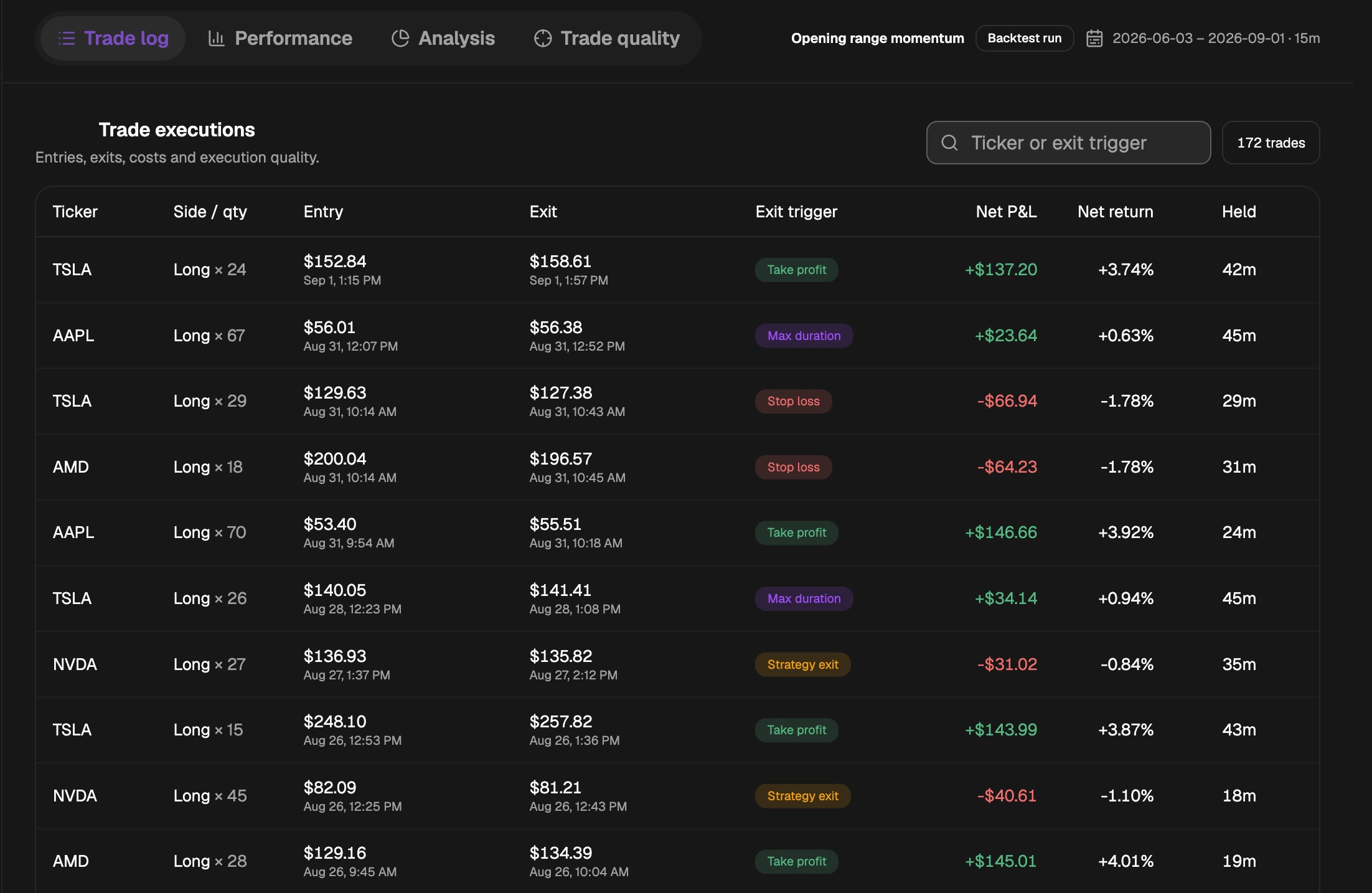
Most traders have a setup they believe in: an opening range breakout, a VWAP reclaim, a moving-average cross. Far fewer know how that setup has actually behaved across hundreds of past sessions, because finding out usually means writing code or replaying charts by hand.
Bufflo removes that step. You describe the rules the way you would explain them to another trader, and the backtest replays them over historical data and shows you every trade they would have taken.
Try it: ask Bufflo AI
- Ask Bufflo AI“Go long on a break of the opening 15-minute range high, stop at the range low, exit at the close”
- Ask Bufflo AI“Short RKLB on 1-minute bars when price is 1 standard deviation above VWAP, cover at VWAP”
- Ask Bufflo AI“Buy AAPL when the 20 SMA crosses above the 50 SMA on the daily chart, sell on the cross back down”
- Ask Bufflo AI“Buy premarket reclaims of the prior day value area low with a 2% stop and 4% target”
What is backtesting in trading?
Backtesting is the process of applying a strategy’s exact entry and exit rules to past price data and recording the trades those rules would have produced. The result shows how often the setup triggered, how many trades won, and what the strategy would have made or lost after costs.
It answers a narrow question: did these rules have an edge in this market over this period? It cannot tell you what will happen next, but it is the fastest way to discard ideas that never worked and to sharpen the ones that might.
How to backtest a trading strategy in Bufflo
- Describe the strategy in plain English: the entry, the exit, the stop and the target, and the tickers and timeframe you want to test.
- Bufflo AI turns the description into a strategy, with a written explanation and the list of rules it will apply, so you can check it understood you.
- Ask Bufflo AI to change anything: the symbols, the date range, the timeframe, the starting capital or your commission assumptions.
- Run the backtest. Bufflo replays the historical data for each symbol and records every trade the rules would have taken.
- Read the results, then refine the rules and run again. Each run keeps the version of the strategy it tested.
No Python and no Pine Script. If you already have a TradingView indicator, the Pine Script converter can rebuild it on BuffloChart as well.
What a Bufflo backtest shows you
| Result | What it tells you |
|---|---|
| Net P&L after costs | What the strategy made or lost once commissions and fees are taken out |
| Trades and win rate | How often the setup triggered and how many of those trades won |
| Profit factor | Total won divided by total lost, after costs, so above 1 means winners outweighed losers |
| Average win and loss, best and worst trade | Whether the edge comes from many small wins or a few large ones |
| Cumulative P&L chart | How the results built up trade by trade |
| Trades on the chart | Each entry and exit drawn on the price chart, so you can check it against price action |
| Per-symbol breakdown | Which tickers carried the strategy and which dragged it down |
| Trade log | Every trade with its direction, entry and exit times and prices, exit reason and net P&L |
When a backtest covers several symbols, each one is tested on its own with the same starting capital, and the totals add them together.
Markets, timeframes and costs
- US stocks and futures, long and short.
- Intraday timeframes such as 1-minute and 15-minute bars, up to daily charts.
- The date range and starting capital you choose.
- Your commission and fee assumptions, deducted from every trade so the P&L is net of costs.
Backtesting pitfalls to avoid
A backtest is only as honest as its assumptions. The most common ways it flatters a strategy:
- Overfitting: tuning the rules until they fit the past perfectly, so they describe old noise rather than a repeatable edge.
- Ignoring costs: commissions, fees and slippage can turn a small edge into a loss, especially on frequent intraday trades.
- Too few trades: a handful of wins proves little. Test enough symbols and sessions for the result to mean something.
- One market regime: a strategy tested only in a calm or only in a trending market may fail when conditions change.
Backtested results are hypothetical. They do not account for every real-world factor and do not predict or guarantee future performance.
From screener to backtest to alert
Backtesting fits between finding a setup and watching for it. Find candidates with the AI stock screener, test the rules behind your setup here, then set custom stock alerts for the exact event you are waiting for.
Frequently asked questions
Is Bufflo’s backtesting free?
Yes. Backtesting is included on every Bufflo plan, including the Free plan, so you can test a strategy before paying for anything.
What is the best free backtesting software?
Look for software that tests your exact rules on intraday data, takes commissions out of every trade, and shows each simulated trade rather than only a summary. Bufflo does all three on its Free plan, and you describe the strategy in plain English instead of writing code.
Do I need to code to backtest a strategy?
No. Describe the rules in plain English and Bufflo AI writes the strategy, with an explanation and a list of the rules it will apply, so you can check them before you run it.
Which markets can I backtest in Bufflo?
US stocks and futures, long and short, on timeframes from 1-minute bars up to daily charts.
Can I include commissions in a backtest?
Yes. Describe your commission and fee assumptions and Bufflo deducts them from every trade, so the P&L you see is net of costs.
Does a profitable backtest mean the strategy will work?
No. A backtest shows how fixed rules behaved on past data. Markets change, and real fills, slippage and costs can differ, so treat a good result as a reason to keep testing, not as a forecast.
Try it on a live workspace.
Open Bufflo in your browser, describe what you want in plain English, and adjust everything yourself. No install, no code.
Market monitoring and analysis, not a brokerage. Not investment advice. Backtested results do not guarantee future performance. Data availability and refresh rates depend on your plan and market data providers.
All features