Stock scanner for day trading: catch momentum while it is moving
A momentum scanner is a stock scanner for day trading: it flags stocks moving fast on unusual volume. Bufflo runs your momentum screens in real time and adds a Signal table: a momentum tape that counts how often a ticker re-triggers your conditions, so a stock that fires five times in two seconds stands out from one that fired once.
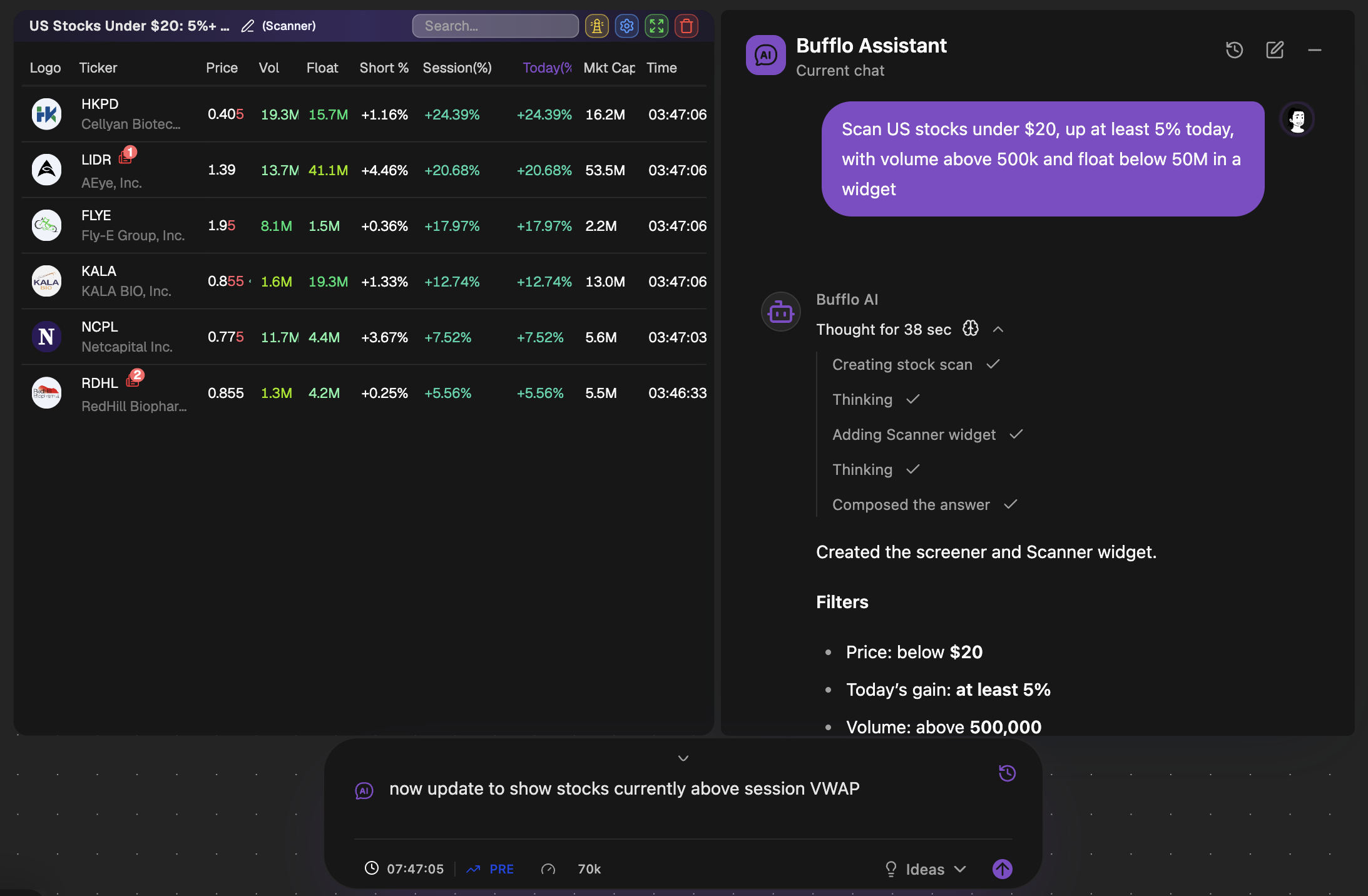
Momentum trading is about timing. The stocks worth watching are the ones moving now, on volume that is unusual for them, usually with a reason behind the move. A list of today’s top gainers tells you what already happened. A momentum scanner is meant to tell you what is happening.
That only works if the scanner is fast, if it lets you define “unusual” for yourself, and if it helps you tell a single spike from a stock that keeps coming back.
Try it: ask Bufflo AI
- Ask Bufflo AI“Up 10% today, under $20, with float below 10 million and 5x relative volume”
- Ask Bufflo AI“Find US stocks up more than 5% in five minutes, with float below 30M and fresh news today”
- Ask Bufflo AI“Build me a long 5-minute VWAP pullback screener”
- Ask Bufflo AI“Build me a 5-minute opening range breakout screener”
What does a momentum scanner look for?
Most momentum scans combine a handful of the same ingredients. The thresholds are personal; the categories are not:
- A fast price change, measured over minutes as well as the whole day.
- Relative volume: trading volume compared with what is normal for that stock.
- Float: the number of shares available to trade. Less supply can mean faster moves in both directions.
- A catalyst, such as news today, that explains why the stock is moving.
- Position against an intraday level such as session VWAP.
Momentum scanner settings worth testing
There is no correct setting, but many small-cap momentum traders start from ranges like these and adjust from there:
| Setting | Typical starting range | Why traders use it |
|---|---|---|
| Price | $1 to $20 | Cheap enough to move in percentage terms, liquid enough to trade |
| Float | Under 20M to 50M shares | Less available supply can amplify a move |
| Relative volume | 2x to 5x or more | Confirms the move has real participation |
| Change | 5%+ in minutes, or 10%+ on the day | Separates movers from drift |
| Catalyst | News today | Gives the move a reason that others can see |
Treat these as a starting point to test against your own results, not as a recommendation. Low-float stocks can reverse as fast as they rise, so the settings that find moves also find risk.
Re-trigger counts: how the Signal table ranks momentum
A normal scanner tells you a stock matched. Bufflo’s Signal table also tells you how often. Every time a ticker re-enters your conditions, the Signal table records it, so you can see intensity build: a name that triggered five times in two seconds is behaving very differently from one that touched the scan once an hour ago.
Signal tables use the same screener rules as your Scanner tables. Run the scan once, then watch it two ways: the Scanner shows everything that currently matches, and the Signal tape shows which names keep firing.
Build your momentum scan in plain English
You do not need to configure filters field by field. Describe the scan to Bufflo AI and it builds the screener rules for you to review. You can also start from momentum presets, including a 5-minute VWAP pullback and an opening range breakout, and edit them to fit how you trade. See the AI stock screener for how the rules are generated.
Screens run in parallel. Keep a low-float runner scan, a VWAP pullback scan and a news scan going at the same time, each in its own table with its own sound and phone alerts.
A momentum workflow in one workspace
- Scanner table with your momentum screen, sorted by change or volume.
- Signal table on the same rules, to see which names keep re-triggering.
- News table filtered to the same screen, so catalysts appear beside the movers.
- A chart linked to the tables: click any row and the chart switches to that ticker.
- Top gainers and top losers tables for a wider view of the session.
Before the open, a premarket gap scanner shows which names are already moving. Once you have a candidate, a custom alert can watch it for you.
Frequently asked questions
What is the difference between a momentum scanner and a stock screener?
A stock screener filters the market by conditions you set. A momentum scanner is a screener tuned for speed: it watches price change and volume in real time and surfaces stocks as they start moving, rather than on a schedule.
Can I run more than one momentum scan at a time?
Yes. Bufflo screeners run in parallel, and each table can have its own sound and phone alerts. How many you can run at once depends on your plan.
Does the momentum scanner work before the market opens?
Yes. Bufflo streams data through pre-market, regular hours and after-hours, so your momentum scans keep running outside the regular session.
What is the best stock scanner for day trading?
One that is fast, covers pre-market and after-hours, and lets you define your own setup. Look for real-time data, float and relative volume filters, news, and alerts. Bufflo adds a Signal table that ranks stocks by how often they re-trigger your scan.
Is there a free stock scanner for day trading?
Yes. Bufflo’s Free plan includes a built-in scanner with stock data refreshing every 15 seconds. Starter refreshes every 5 seconds, and Trader and Premium stream stock data in real time with custom AI-built scans.
Will a momentum scanner tell me when to buy?
No. It shows which stocks match the conditions you define. Entry, exit and position size are your decisions, and nothing in Bufflo is financial advice.
Try it on a live workspace.
Open Bufflo in your browser, describe what you want in plain English, and adjust everything yourself. No install, no code.
Market monitoring and analysis, not a brokerage. Not investment advice. Backtested results do not guarantee future performance. Data availability and refresh rates depend on your plan and market data providers.
All features